Wednesday, January 25, 2017

Different ways of navigation

Different ways of navigation


1. Use of <apex:outputLink> to navigate to a record detail page [applicable to Classic & Lightning]

1
2
3
<apex:outputLink value="{!URLFOR($Action.Contact.View, c.Id)}">
 {!c.LastName}
 </apex:outputLink>

2. <apex:commandLink/> as button to navigate to Contact Detail page without the use of controller method [applicable to Salesforce classic]:

1
2
3
4
<apex:commandLink action="{!URLFOR($Action.Contact.View, c.Id)}" 
value="Goto DetailPage" 
target="_blank" styleClass="btn" 
style="padding: 4px; text-decoration: none;"/>

3. Navigation with the use of `<apex:commandButton/>` through Controller method [applicable to Classic & Lightning]:

 1
 2
 3
 4
 5
 6
 7
 8
 9
10
<apex:commandButton value="Goto DetailPage" action="{!gotoContactDetailPage}" 
    reRender="form">
    <apex:param name="contactid" value="{!c.Id}" assignTo="{!contactId}"/>
</apex:commandButton>


public PageReference gotoContactDetailPage()
{
    return (new ApexPages.StandardController (new Contact(Id=contactId))).view();
}

4. a. Use of formula field to open a visualforce page in Console and standard view page in Standard or Custom App. [applicable to Classic]

1
2
3
4
5
HYPERLINK("javascript:if(typeof(srcUp)=='function') {srcSelf('/apex/VisualforcePage?id=" & Id & "');} "+ 
" else {window.location.href='/" & Id & "'}" 
,Name 
, "_Parent" 
)

4.b. Use of formula field to open either User or Queue in Console and Standard View Page in Standard or Custom App.


 1
 2
 3
 4
 5
 6
 7
 8
 9
10
11
12
IF(BEGINS(Case_Owner_Id__c,'005'),
 HYPERLINK("javascript:if(typeof(srcUp)=='function') {srcUp('/" & Case_Owner_Id__c & "');} "+ 
 " else {window.open('/" & Case_Owner_Id__c & "')}" 
 ,Case_Owner_Name__c 
 , "_blank" 
 ),
 HYPERLINK("javascript:if(typeof(srcUp)=='function') {srcUp('/setup/own/groupdetail.jsp?id=" & Case_Owner_Id__c & "&isdtp=vw');} "+ 
 " else {window.open('/setup/own/groupdetail.jsp?id=" & Case_Owner_Id__c & "&isdtp=vw')}" 
 ,Case_Owner_Name__c 
 , "_blank" 
 )
)

5 .a. Take the value from the input field and pass that value as a parameter to Salesforce report. [applicable for Classic]

 1
 2
 3
 4
 5
 6
 7
 8
 9
10
<apex:page>
    <apex:form>
            <apex:inputText id="theTextInput"/>
            <a href="javascript:window.open('https://cs21.salesforce.com/00Oq0000000YUvUEAW?pv0=' 
            + document.getElementById('{!$Component.theTextInput}').value 
            + '&pv1=2018-01-01');">
            click me
            </a>
    </apex:form>
</apex:page>

5. b.  Take the value from input field and pass that as a parameter to Salesforce report. [applicable to Lightning (Spring'17 feature)]

 1
 2
 3
 4
 5
 6
 7
 8
 9
10
11
<apex:page>
    <apex:form>
            <apex:inputText id="theTextInput"/>
            <a href="javascript:window.open('https://na1.salesforce.com/one/one.app#/sObject/00OR0000000PCHYMA4/view'
            + '?t=1479844235107&fv0=New%20Business' 
            + document.getElementById('{!$Component.theTextInput}').value 
            + '&fv1=2018-01-01');">
            click me
            </a>
    </apex:form>
</apex:page>

6. Custom button to open a visualforce page in console and standard view page in Standard or Custom App. [applicable to Classic]

1
2
3
4
5
6
7
8
{!REQUIRESCRIPT("/soap/ajax/28.0/connection.js")} 
{!REQUIRESCRIPT("/support/console/28.0/integration.js")} 
var url = '/apex/VisualforcePage'; 
if (sforce.console.isInConsole()) { 
navigateToUrl(url + '?inline=1'); 
} else { 
window.open(url,'_self'); 
}

Note that: if  inline=1 is not specified, page will not be part of console.
7. Formula field open link to record details page or visualforce page [applicable to Classic & Lightning]

1
2
HYPERLINK( '/' + Id , Name, '_blank')
HYPERLINK( '/apex/visualforcePage', Name, '_blank')

8. Display screen without header and sidebar (Applicable for Console and Classic mode) calling from  custom button of Record Details page.


{!REQUIRESCRIPT("/soap/ajax/28.0/connection.js")} 
{!REQUIRESCRIPT("/support/console/28.0/integration.js")} 

var pageUrl = '{!URLFOR($Action.Activity.LogCall)}'; 
var parameters = '?title=Call&who_id={!Lead.Id}'; 
var link = pageUrl + parameters; 
if (sforce.console.isInConsole()) 
{ 
 srcUp(pageUrl); 
} else { 
 window.open(pageUrl + '&isdtp=mn' ,'_self'); 
}

9. Navigate to Standard Page or Visualforce page based on the recordtype. Create a formula Text field and use the following code.


 HYPERLINK(
   IF( RecordType.DeveloperName = 'Accounting', '/'+ Id , '/apex/yourVisualforcePage?id=' + Id
   ) 
    ,Name 
    , "_Parent" 
    )

Case duration of ageing

Case duration of ageing


The formula will show how long case is still not completed status:

IF(
    NOT(ISPICKVAL( Status , "Completed")),
    IF(FLOOR( (NOW()- CreatedDate)) > 0,TEXT( FLOOR( (NOW()- CreatedDate)) ) & " days ", "") 
    & IF(FLOOR( MOD( (NOW()- CreatedDate)* 24, 24 ) )>0,TEXT( FLOOR( MOD( (NOW()- CreatedDate)* 24, 24 ) ) ) & " hours ","") 
    & TEXT( ROUND( MOD( (NOW()- CreatedDate)* 24 * 60, 60 ), 0 ) ) & " minutes "
    & TEXT( ROUND( MOD( (NOW()- CreatedDate)* 24 * 60*60, 60 ), 0 ) ) & " seconds", 
    ""
)

It will display the value like this:
19 days 13 hours 7 minutes 53 seconds

Example of BusinessHours calculation


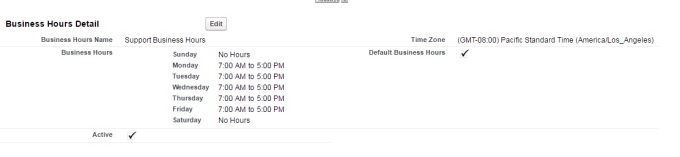
We have a requirement to send an email alert to users after 4 business hours from Task Creation Date ie., Our Business hours are from 7am to 5pm (Monday to Friday) and if Task is created at 4pm on Monday, we need to send an email at 10am on Tuesday. Because only 1 business hour was left on Monday and remaining 3 hours on next business day.
Business Hours in organization:
business-hour
The solution can be achieved upon using following function:

BusinessHours.add(businessHoursId, startDate, intervalMilliseconds)

I have configured my user’s timezone PST as per your Business Hours screen and establish following code. I have mentioned SLAHours as 6 so that it could past today’s business hours.
Note that, system.now() returns UTC time, so for sake to clarity I have also printed my local time which helps me in easy calculation.


Utility Class


 1
 2
 3
 4
 5
 6
 7
 8
 9
10
11
12
13
14
15
16
17
18
19
20
21
22
23
24
25
26
27
28
29
30
31
32
33
34
35
36
37
38
39
40
public with sharing class BusinessHoursServices
{
    //retrieves & assign the Organization level Business Hours to defaultBH 
    @testVisible static BusinessHours defaultBH
    {
        get
        {
            if (defaultBH == null)
                defaultBH = [SELECT Id FROM BusinessHours WHERE IsDefault = true];
            return defaultBH;
        }
        private set;
    }
        
    public static Boolean isWithin()
    {
        return isWithin(Datetime.now());
    }
    
    public static Boolean isWithin(Datetime input)
    {        
        return BusinessHours.isWithin(defaultBH.Id, input);
    }

    public static  Datetime nextStartDate()
    {
        return nextStartDate(Datetime.now());
    }
  
    public static Datetime nextStartDate(Datetime input)
    {
  return BusinessHours.nextStartDate(defaultBH.Id, input);
    }
   
    public static Datetime getSLATimeByBusinessHour (DateTime input, Integer SLAhours)
    {        
        return BusinessHours.add(defaultBH.Id,input, SLAhours* 60 * 60 * 1000L);
    }
   
}

Usage:

 1
 2
 3
 4
 5
 6
 7
 8
 9
10
11
12
13
14
15
16
17
18
Datetime currentTime = System.now();
System.debug('current time=' + System.now());
TimeZone tz = UserInfo.getTimeZone();
System.debug('Display name: ' + tz.getDisplayName());

System.debug('Current local time=' + currentTime.format('MM-dd-yyyy ') + ' ' 
  + currentTime.format('h:mm a'));

Id businessHourId = [SELECT Id FROM BusinessHours WHERE IsDefault = true].id;

//check the current datetime falling on the same business day
Boolean isSameDayWithinBusinessHour =  BusinessHoursServices.isWithin(System.now());
System.debug('isSameDayWithinBusinessHour=' + isSameDayWithinBusinessHour);

Integer slaHours = 6;
Datetime targetDT = BusinessHours.add(businessHourId,currentTime, SLAhours* 60 * 60 * 1000L);
System.debug('target date on local time =' + targetDT.format('MM-dd-yyyy ') + ' ' 
             + targetDT.format('h:mm a'));

Debug Log

1
2
3
4
5
USER_DEBUG|[2]|DEBUG|current time=2016-11-09 20:29:17
USER_DEBUG|[4]|DEBUG|Display name: Pacific Standard Time
USER_DEBUG|[6]|DEBUG|Current local time=11-09-2016  12:29 PM
USER_DEBUG|[13]|DEBUG|isSameDayWithinBusinessHour=true
USER_DEBUG|[16]|DEBUG|target date on local time =11-10-2016  8:29 AM

Understanding of calculations:
Business hours = 7AM to 5PM PST It will take (5PM – 12:29PM) i.e. 4 hours 31 mins on today and rest 1 hour 29 mins on next day starting at 7AM.
Finally SLA end time is 11-10-2016 8:29 AM.
For more information about Business Hours refer this: Apex Class BusinessHours

Lightning - Notes (attached to multiple objects)

Lightning - Notes


From Winter'16 release, we can create notes and attached it to multiple objects.
By the way, it is not getting attached to Notes & Attachments.
Steps:
  1. Enable Notes
enable-notes
2. Create Note and associate to multiple records. We can share this to people or user.
adding-note-to-multiple-objects
3. This saved notes can be accessible from Files menu.
notes-under-files-tab
4. To retrieve the notes from workbench, use the SOQL query on ContentDocument
notes-at-contentdocument
5. To retrieve the associated parent records, use SOQL query on  ContentDocumentLink object
It will show 3 records, (one who has created the notes and 2 records of the associated objects i.e. Contact and Opportunity)
notes-at-contentdocumentlink
6. Difference between Notes vs Old Note-Taking tool
notes-difference
For more information, Adding Notes to Records Trailhead.