Wednesday, June 28, 2017

Send Email from Custom Button Click

Objective

Sometimes, we get a requirement to send email from Record detail page, clicking on Custom Button (naming Send Email).

I was answering this question in Salesforce Stackexchange Send email on Custom button click? and thought that it might help others.

Solution

Here is an approach to handle this requirement.

Create a Javascript Custom Button (Detail Page) button and use the following code:


{!REQUIRESCRIPT("/soap/ajax/31.0/connection.js")} 
{!REQUIRESCRIPT("/soap/ajax/31.0/apex.js")}
var message = new sforce.SingleEmailMessage(); 

message.targetObjectId = "{!Contact.Id}";
message.toAddresses = "{!Contact.Email}";
message.templateId = "00Xq0000000HwSw"; //predefined email template
message.whatId = "{!Case.Id}"; 

var result = sforce.connection.sendEmail([message]); 
if(result[0].success == 'true') 
{ 
    alert("Email sent successfully"); 
} else 
{ 
    alert("Sending failed"); 
} 
alert(result);

Note: Only User, Contact, Lead, or Person Account objects are allowed for targetObjectId

If you need to refer specific attributes then download Partner WSDL and refer complexType SingleEmailMessage


<complexType name="SingleEmailMessage">
<complexContent>
<extension base="tns:Email">
<sequence>
<element name="bccAddresses" minOccurs="0" maxOccurs="25" type="xsd:string" nillable="true"/>
<element name="ccAddresses" minOccurs="0" maxOccurs="25" type="xsd:string" nillable="true"/>
<element name="charset" type="xsd:string" nillable="true"/>
<element name="documentAttachments" minOccurs="0" maxOccurs="unbounded" type="tns:ID"/>
<element name="entityAttachments" minOccurs="0" maxOccurs="unbounded" type="tns:ID"/>
<element name="fileAttachments" minOccurs="0" maxOccurs="unbounded" type="tns:EmailFileAttachment"/>
<element name="htmlBody" type="xsd:string" nillable="true"/>
<element name="inReplyTo" minOccurs="0" type="xsd:string" nillable="true"/>
<element name="optOutPolicy" type="tns:SendEmailOptOutPolicy" nillable="true"/>
<element name="orgWideEmailAddressId" minOccurs="0" maxOccurs="1" type="tns:ID" nillable="true"/>
<element name="plainTextBody" type="xsd:string" nillable="true"/>
<element name="references" minOccurs="0" type="xsd:string" nillable="true"/>
<element name="targetObjectId" type="tns:ID" nillable="true"/>
<element name="templateId" type="tns:ID" nillable="true"/>
<element name="toAddresses" minOccurs="0" maxOccurs="100" type="xsd:string" nillable="true"/>
<element name="treatBodiesAsTemplate" type="xsd:boolean" nillable="true"/>
<element name="treatTargetObjectAsRecipient" type="xsd:boolean" nillable="true"/>
<element name="whatId" type="tns:ID" nillable="true"/>
</sequence>
</extension>
</complexContent>
</complexType>

It's a fun! Share this post to others in case it helps!

Monday, May 8, 2017

Update Case Action on feed based layout

Introduction

With the use of feed based layout and actions, user can perform multiple updates at one goal.

For example, if user wants to perform following updates in a single update button click event instead of multiple clicks.

- Change Case Owner
- Update Case Fields
- Update Case Comments.

The feed view action will look like this:


Solution


1. Create new Case Action called "Update Case"  as follows:

  • Setup --> Cases --> Buttons, Links and Actions.
  • Click New Action Button and enter following details


2. Click on Edit Layout and place desired fields on the layout


3. Create Feedback page layout and in the Quick Actions section, add this "Update Case" action.


4. Assign the page layout to respective profiles.

5. You can also track those fields from Chatter, for that follow these steps:
  • Setup --> Chatter --> Feed tracking
  • Choose Case object
  • Choose "Enable Feed Tracking" checkbox
  • Choose desired fields for feed tracking. You can select maximum 20 fields for tracking.


6. Now open a Case record and click on Feed icon


7. Select "Update Case" tab (refer 1st screen) and enter attribute values and click on Update.

8. System will update all the field values in one single update. 

9. You will see the updates in Feed (like below) as well as Case Details Page.


Saturday, April 1, 2017

Keyword Search Series : Custom Controller Pagination ~ easiest way

Motivation

So far we know, pagination can be easily be achieved by StandardSetController class.

I have seen cases where developer has a notion like until and unless we use controller extension and StandardSetController as an argument in Constructor, pagination is difficult to achieve. For this, I have tried this approach in Custom Controller with the search input from Visualforce screen.

Use Case


User will provide the input and clicking on Search button, the results will be displayed in paginated format. User can change the page size and system will fetch the records based on selected page size.

Solution

For the sake of learning, I have created a visualforce page as below.


Visualforce

It will take Opportunity Name as input search criteria and clicking on Search button it will pass to the controller.

 1
 2
 3
 4
 5
 6
 7
 8
 9
10
11
12
13
14
15
16
17
18
19
20
21
22
23
24
25
26
27
28
29
30
31
32
33
34
35
36
37
38
39
40
41
42
43
44
45
46
<apex:page id="filterPage" controller = "FilterSearch">
 <apex:form style="overflow-y:auto;overflow-x:auto;margin-right: 5px;margin-left: 5px;margin-top: 3px;" id="searchForm">
        <apex:actionFunction name="refreshPageSize" action="{!refreshPageSize}" status="fetchStatus" reRender="searchBlock"/>
        
  <apex:outputLabel value="Search By Opportunity Name:"/>          
        <apex:inputText value="{!searchString}" label="Opportunity Name:"/>            
        <apex:commandButton value="Search " action="{!showAll}"/>
  
        <apex:pageBlock title="Results" rendered="{!showResult}" id="searchBlock"> 
            <apex:pageblockTable value="{!Opps}" var="a" id="tabId">  
                <apex:column>
     <a href="/{!a.id}" target="_blank"> {!a.name}</a>
    </apex:column>
    <apex:column rendered="false" id="id">
     <apex:outputField value="{!a.id}" />
    </apex:column>
    <apex:column headerValue="Account Name">
     <apex:outputField value="{!a.account.name}" />
    </apex:column>

    <apex:column headerValue="Stage">
     <apex:outputField value="{!a.stagename}" />
    </apex:column>

    <apex:column headerValue="Forecast Category" >
     <apex:outputField value="{!a.ForecastCategoryName}"  />
    </apex:column>

            </apex:pageBlockTable>
            <apex:panelGrid columns="8">             
                <apex:selectList value="{!size}" multiselect="false" size="1" onchange="refreshPageSize();">
                    <apex:selectOptions value="{!paginationSizeOptions}"/>
                </apex:selectList>           
                <apex:commandButton status="fetchStatus" reRender="searchBlock" value="<<" action="{!setCon.first}" disabled="{!!setCon.hasPrevious}" title="First Page"/>
                <apex:commandButton status="fetchStatus" reRender="searchBlock" value="<" action="{!setCon.previous}" disabled="{!!setCon.hasPrevious}" title="Previous Page"/>
                <apex:commandButton status="fetchStatus" reRender="searchBlock" value=">" action="{!setCon.next}" disabled="{!!setCon.hasNext}" title="Next Page"/>
                <apex:commandButton status="fetchStatus" reRender="searchBlock" value=">>" action="{!setCon.last}" disabled="{!!setCon.hasNext}" title="Last Page"/>
                <apex:outputText >{!(setCon.pageNumber * size)+1-size}-{!IF((setCon.pageNumber * size)>noOfRecords, noOfRecords,
                     (setCon.pageNumber * size))} of {!noOfRecords}
                </apex:outputText>                 
                <apex:outputPanel >                      
                </apex:outputPanel>
            </apex:panelGrid>                                      
      </apex:pageBlock> 
    </apex:form>    
</apex:page>


Custom Controller

It has following activities:

1. In the Constructor, assigning default page size and preparing the list of page size options.

2. showAll() - This method is getting called with Search button is clicked. In this method, searchString is getting collected and getting passed into dynamic query.

Now, main important part, this line, create QueryLocator object using Database.getQueryLocator(query) and assign that into ApexPages.StandardSetController constructor to create StandardSetController object.

Rest is easy. StandardSetController will take all burden for pagination.


setCon = new ApexPages.StandardSetController(Database.getQueryLocator(query));


3. getOpps() - This method return List of records based on pageSize.

4. refreshPageSize() - This method is getting called when paginated size is changed on screen.


 1
 2
 3
 4
 5
 6
 7
 8
 9
10
11
12
13
14
15
16
17
18
19
20
21
22
23
24
25
26
27
28
29
30
31
32
33
34
35
36
37
38
39
40
41
42
43
44
45
46
47
48
49
50
51
52
53
54
55
56
57
58
59
60
61
62
63
64
65
66
67
68
69
70
71
72
73
74
75
76
77
78
public class FilterSearch  
{
    public String searchString{get;set;}
    public Boolean showResult{get;set;}
    public Integer noOfRecords{get; set;}
    public Integer size{get;set;}
    public ApexPages.StandardSetController setCon{get;set;}    
    public List<SelectOption> paginationSizeOptions{get;set;}
 
    String errorStr = '';    
         
    /**
    * FilterSearch
    * Constructor to initiate the default values at the time of Loading
    */    
    public FilterSearch()
    {
        size=10; //default page size

  //pagination size options
        paginationSizeOptions = new List<SelectOption>();
        paginationSizeOptions.add(new SelectOption('10','10'));
        paginationSizeOptions.add(new SelectOption('20','20'));
        paginationSizeOptions.add(new SelectOption('30','30'));
              
    }
    
    public void showAll()
    {
        try
        {
            if(String.isNotBlank(searchString))
            {  
              //build SOQL query string
             String query='Select Id,Name, account.name, stagename, ForecastCategoryName FROM Opportunity WHERE Name LIKE \'%' + searchString + '%\' order by Name LIMIT 1000';
    
               //return querylocator to an instance of StandardSetController
                setCon = new ApexPages.StandardSetController(Database.getQueryLocator(query));            
                if(setCon.getResultSize() >0)
                {
                    showResult = true;
                }else{
                    showResult = false;
                    ApexPages.addmessage(new ApexPages.message(ApexPages.severity.INFO,'No Records Found.'));
                }        
            }            
        }catch(Exception ex)
        {
            errorStr ='Error Occured while Searching.';
            ApexPages.addmessage(new ApexPages.message(ApexPages.severity.ERROR, 'errorStr:' +ex.getMessage()));
        }   
    }

    public List<Opportunity> getOpps() 
    {
        if(setCon.getResultSize() >0)
        {
          setCon.setPageSize(size);  
          noOfRecords = setCon.getResultSize();
          return (List<Opportunity>)setCon.getRecords();
        }else
        {
          return null;
        }
        return null;
    }
      
    /**
    * refreshPageSize
    * Changes the size of Pagination.
    * @param    
    * @return void
    */
    public void refreshPageSize() 
    {
        setCon.setPageSize(size);         
    }
}

Results


Hope it helps! and if so, then share with your friends.

Link to my answer in stackexchange: My Answer in Stackechange

Further Reading


Wednesday, March 29, 2017

Simple way to generate XML, parse and retrieve values from XML

Use Case

We usually get a requirement to store Salesforce records in XML format. Later, we may need to parse the XML and retrieve the data from XML and store them into a Map for future use.

Solution

I have created this class to generate some hard coded data. Later through usable parseXML method that has been parsed.


 1
 2
 3
 4
 5
 6
 7
 8
 9
10
11
12
13
14
15
16
17
18
19
20
21
22
23
24
25
26
27
28
29
30
31
32
33
34
35
36
37
38
39
40
41
42
43
44
45
46
47
48
49
50
51
52
53
54
55
56
57
58
59
60
61
62
63
64
65
66
67
68
69
70
71
72
73
public class XMLParserClass
{
    public Map<String, String> xmlDataMap = new Map<String,String>();
    
    public String generateXML()
    {
        Dom.Document doc = new Dom.Document();
        Dom.Xmlnode rootNode = doc.createRootElement('TestReport', null, null);
        
        Dom.Xmlnode headerNode = rootNode.addChildElement('header', null, null);
        //assign header attributes
        headerNode.setAttribute('id', 'TEST1'); 
        
        Dom.Xmlnode childNode = headerNode.addChildElement('detail', null, null);               
        childNode.setAttribute('id','CHILD1');              
        childNode.setAttribute('Amount','1000');  
        
        String xmlString = doc.toXmlString();
        System.debug('xmlString =' + xmlString);
        return xmlString;
    }
    
 //generated xml
 /*
    <?xml version="1.0" encoding="UTF-8"?>
    <TestReport>
    <header id="TEST1">
    <detail id="CHILD1" Amount="1000" />
    </header>
    </TestReport>
    */
 
 
    public void parserXML(String toParse)
    {
        xmlDataMap = new Map<String,String>();
        DOM.Document doc = new DOM.Document();
        try{
            doc.load(toParse);
            DOM.XMLNode root = doc.getRootElement();
            traverseThroughXML(root);
        }catch(Exception ex){
            ApexPages.Message msg = new ApexPages.Message(ApexPages.Severity.Error, ex.getMessage());
            ApexPages.addMessage(msg);
       }  
    }
    
    /**
     * traverseThroughXML
     * This method traverse through the xml, read the data from XML.
     * @param
     * @return void.
     */
    private void traverseThroughXML(DOM.XMLNode node) 
    {
        if (node.getNodeType() == DOM.XMLNodeType.ELEMENT) 
        {
            System.debug('node.getName()=' + node.getName());
            if(node.getName().equalsIgnoreCase('detail'))
            {
                if (node.getAttributeCount() > 0) 
                { 
                  xmlDataMap.put(node.getAttributeValue(node.getAttributeKeyAt(0), node.getAttributeKeyNsAt(0))
                                ,node.getAttributeValue(node.getAttributeKeyAt(1), node.getAttributeKeyNsAt(1)));
                }
            }
            for (Dom.XMLNode child: node.getChildElements()) 
            {
              traverseThroughXML(child);
            }
        } 
    }
}

Usage

1
2
3
4
XMLParserClass cls = new XMLParserClass();
String xmlStr = cls.generateXML();
cls.parserXML(xmlStr);
System.debug(cls.xmlDataMap);

Outcome in Debug Log


Sunday, March 26, 2017

Pass Collection to Visual Workflow, parse and save case records

Use Case

Business has a requirement to update multiple cases from List view. User will save multiple field values taking an input from screen and finally save those records.


User will click on "Update Field Values" button and following fields will be displayed on the screen.


User will enter Due Date and Status and finally save collection of records.

Solution

If the user wants to update single field then that can be achievable by inline editing. But if there are more than one fields to update then that can be achieved by using flow.

Create a List View Custom button and use this code to pass parameters to the flow.
vSelectedCaseIds which contains case ids collection which can be found from {!GETRECORDIDS($ObjectType.Case)}.
vCaseCount which contains number of selected case id count.
retURL where it will be landed after completion.


 1
 2
 3
 4
 5
 6
 7
 8
 9
10
11
12
13
14
15
16
17
18
{!RequireScript("/soap/ajax/29.0/connection.js")}

var caseObj = new sforce.SObject("Case");
var selectedCases = {!GETRECORDIDS($ObjectType.Case)}; //chosen records from list view checkboxes

//check at-least one record is selected
if (selectedCases[0] == null) {
   alert("You must select at least one record");
} else 
{
    var serverUrl = '{!$Api.Partner_Server_URL_260}';
    var position = {!FIND( '/services', $Api.Partner_Server_URL_260)};
    var base = serverUrl.substring(0,position-1);

    var url = base +encodeURI('/flow/Update_Field_Values?vSelectedCaseIds=' + selectedCases +  '&vCaseCount=' + selectedCases.length +  '&retURL=/500/o');

    window.open(url, '_self');
}

The complete flow will look like this:


Step by step implementation:

1. Screen


2. Decision - check counter size


3. Assignment - Retrieve Single Case Id from param


caseIdFormula:

LEFT({!vRemainingCaseIds}, 15)


4. Assignment - Assign values to Case Object


Where varSObjectCase is SObject input and output variable.

5. Assignment - Add All Case Objects


Where All_Case_Sobjects is SObject Collection variable


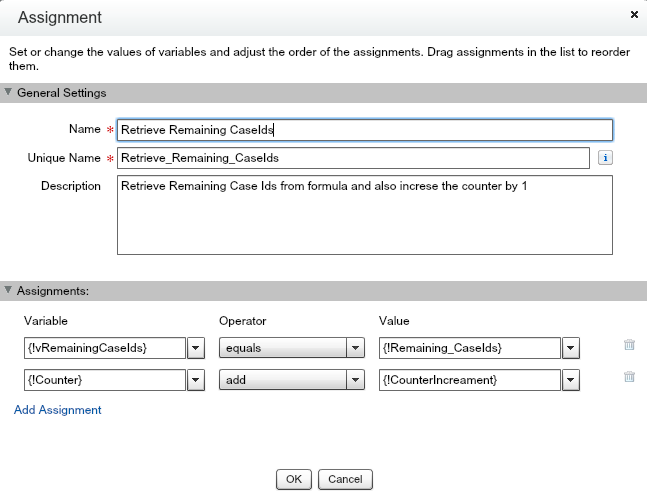
6. Assignment - Retrieve Remaining CaseIds


Remaining_CaseIds - Formula


TRIM(
RIGHT({!vRemainingCaseIds}, (LEN({!vRemainingCaseIds})-16))
)

7. Decision - If Counter less than vCaseCount


8. Fast Update


9. Success


Conclusion

I have tried to put a solution through flow instead of using visualforce page.

Since this type of complete implement is not readily available at google, that's why I have tried my best put it in a proper way.

Have fun and if it is helpful then share with your friends.

Sunday, March 19, 2017

Efficient coding using Group By Rollup

I have come across this use case recently during answering a question in Salesforce stackexchange.

Use Case

Family records are being captured as follows:


Requirement is to show repetitive summations of Weight and Workout_hours both at GrandParent and Parent level.

Expected result should look like this:

Solutions

I could think of preparing the data using GROUP BY ROLLUP.

SOQL will look like this:


SELECT GrandParent__c, Parent__c, Child__c, SUM(Weight__c), SUM(Workout_Hours__c) ,
GROUPING (GrandParent__c) grpGrantPt, GROUPING(Parent__c) grpPT
FROM Family__c
GROUP BY ROLLUP(GrandParent__c, Parent__c,Child__c)
ORDER BY GrandParent__c, Parent__c, Child__c

Query Result

The above query returns expected result, only thing I need to eliminate first record which is giving total summation. and two columns GROUPING (GrandParent__c) grpGrantPt, GROUPING(Parent__c) grpPT which are not needed to show in visualforce.


Controller


Now it is time to prepare the data so that it can be displayed into visualforce in a most efficient way. For this I have taken a help of Wrapper class (FamilyData)


 1
 2
 3
 4
 5
 6
 7
 8
 9
10
11
12
13
14
15
16
17
18
19
20
21
22
23
24
25
26
27
28
29
30
31
32
33
34
35
36
37
38
39
40
41
42
43
44
45
46
47
48
49
50
51
52
53
54
55
56
57
58
59
public class FamilyClass
{
    public List<FamilyData> lstFamilyRecord {get;set;}

    public PageReference displayData()
    {
        Boolean firstRecord = true;

        lstFamilyRecord = new List<FamilyData>();
         AggregateResult[] lstFamily = [SELECT GrandParent__c, Parent__c, Child__c, SUM(Weight__c) weightTotal, SUM(Workout_Hours__c) whTotal ,
                                        GROUPING (GrandParent__c) grpGrantPt, GROUPING(Parent__c) grpPT
                                        FROM Family__c
                                        GROUP BY ROLLUP(GrandParent__c, Parent__c,Child__c)
                                        ORDER BY GrandParent__c, Parent__c, Child__c];

        for(AggregateResult familyObj:lstFamily)
        {
            if(!firstRecord)
            {
                FamilyData wrapper = new FamilyData();
                wrapper.GrantParent = (String) familyObj.get('GrandParent__c');
                wrapper.Parent = (String) familyObj.get('Parent__c');
                wrapper.Child = (String) familyObj.get('Child__c');

                if(familyObj.get('GrandParent__c') !=null && familyObj.get('Parent__c') !=null && familyObj.get('Child__c') !=null)
                {
                    wrapper.isChildRecord = true;
                }
                else if (familyObj.get('GrandParent__c') !=null && familyObj.get('Parent__c') !=null && familyObj.get('Child__c') ==null)
                {
                    wrapper.isParentRecord = true;
                }
                else if(familyObj.get('GrandParent__c') !=null && familyObj.get('Parent__c') ==null && familyObj.get('Child__c') ==null)
                {
                    wrapper.isGrantParentRecord = true;
                }
                wrapper.Weight = familyObj.get('weightTotal')!=null? ((Decimal)familyObj.get('weightTotal')).intValue():null;
                wrapper.WorkoutHours = familyObj.get('whTotal')!=null? ((Decimal)familyObj.get('whTotal')).intValue() :null;
                lstFamilyRecord.add(wrapper);
            }
            firstRecord = false;
        }

        return null;
    }

    public class FamilyData
    {
        public String GrantParent {get;set;}
        public String Parent {get;set;}
        public String Child {get;set;}
        public Integer Weight {get;set;}
        public Integer WorkoutHours {get;set;}
        public Boolean isGrantParentRecord {get;set;}
        public Boolean isParentRecord {get;set;}
        public Boolean isChildRecord {get;set;}
    }

}

Visualforce


 1
 2
 3
 4
 5
 6
 7
 8
 9
10
11
12
13
14
15
16
17
18
19
20
21
22
23
24
<apex:page id="familyPage" controller="FamilyClass" action="{!displayData}" showheader="true" sidebar="false"> 
    <table id="familytable" border="1"> 
        <tr>
            <th>Parents</th>
            <th>Weight</th>
            <th>Work Hours</th>
        </tr>             
        <apex:repeat id="myRepeat" value="{!lstFamilyRecord}" var="key"> 
            <tr>
                <td>
                    <apex:outputText style="color: red;" value="{!key.GrantParent}" rendered="{!key.isGrantParentRecord}"/>
                    <apex:outputText style="color: blue;" value="{!key.Parent}" rendered="{!key.isParentRecord}"/>
                    <apex:outputText value="{!key.Child}" rendered="{!key.isChildRecord}"/>
                </td>
                <td>
                    <apex:outputText value="{!key.Weight}"/>
                </td>
                <td>
                    <apex:outputText value="{!key.WorkoutHours}"/>
                </td>
            </tr>                       
        </apex:repeat>
    </table>          
</apex:page>

Final Output

Conclusion

Usually, looking at the requirements we think of preparing the data and logic in apex or visualforce in a complex way. But if we can leverage SOQL logic efficiently like this we may end up nice implementation.

Sharing with you, if it helps!

Link to stackExchange question:
http://salesforce.stackexchange.com/questions/164382/how-to-iterate-repetitive-rows-in-table-to-calculate-count-and-show-the-sum/164394#164394