Monday, May 27, 2019

Create Salesforce Big Objects through Apex and Metadata API

Motivation behind this


I was exploring Big Objects and trying to create Big Object and Field definitions through Metadata API. I have searched all possible way but didn't find any code regarding this use case.

I am thankful to Andrew Fawcett (Andrew Fawcett) and his team for building MetadataService.cls which a wrapper to Metadata API which actually helped me to build this solution. Though this example doesn't exists anywhere which motivates me to write this code.

It has taken almost 5 hours to build this solution since I didn't have any prior experience to handle Metadata API through Apex.

Little bit information about Big Objects


  • It stores billions of data on Salesforce Platform and we can archive data from other objects or datasets.
  • There are two type of Big Objects: Standard and Custom
  • Only following field types are available: Lookup Relation, Number, Text, Long Text Area and Date/Time
  • Big Object supports custom Lightning and Visualforce components rather than standard UI elements home pages, detail pages, list views etc.
  • We can create up to 100 Big Objects in per org.
  • It doesn't support encryption.
For more information, refer Big Objects Implementation Guide

Implementation Approach and important points


Firstly I have referred the codebase in MetadataService.cls and then started exploring.

To create Big Objects following points must be followed:

1. AllOrNoneHeader element and allOrNone should be true.

2. During firing createMetadata(), Big Object definition along with a custom field and index are must.

3. It will use MetadataService.CustomObject to create Big Object, but fullName should have API Name which ends with __b

4. Big Object doesn't have Standard Name field.

5. Big Object doesn't have SharingModel. Though you can use permission sets to assign permissions.


Script


I have provided step by step approach with in-line comments.

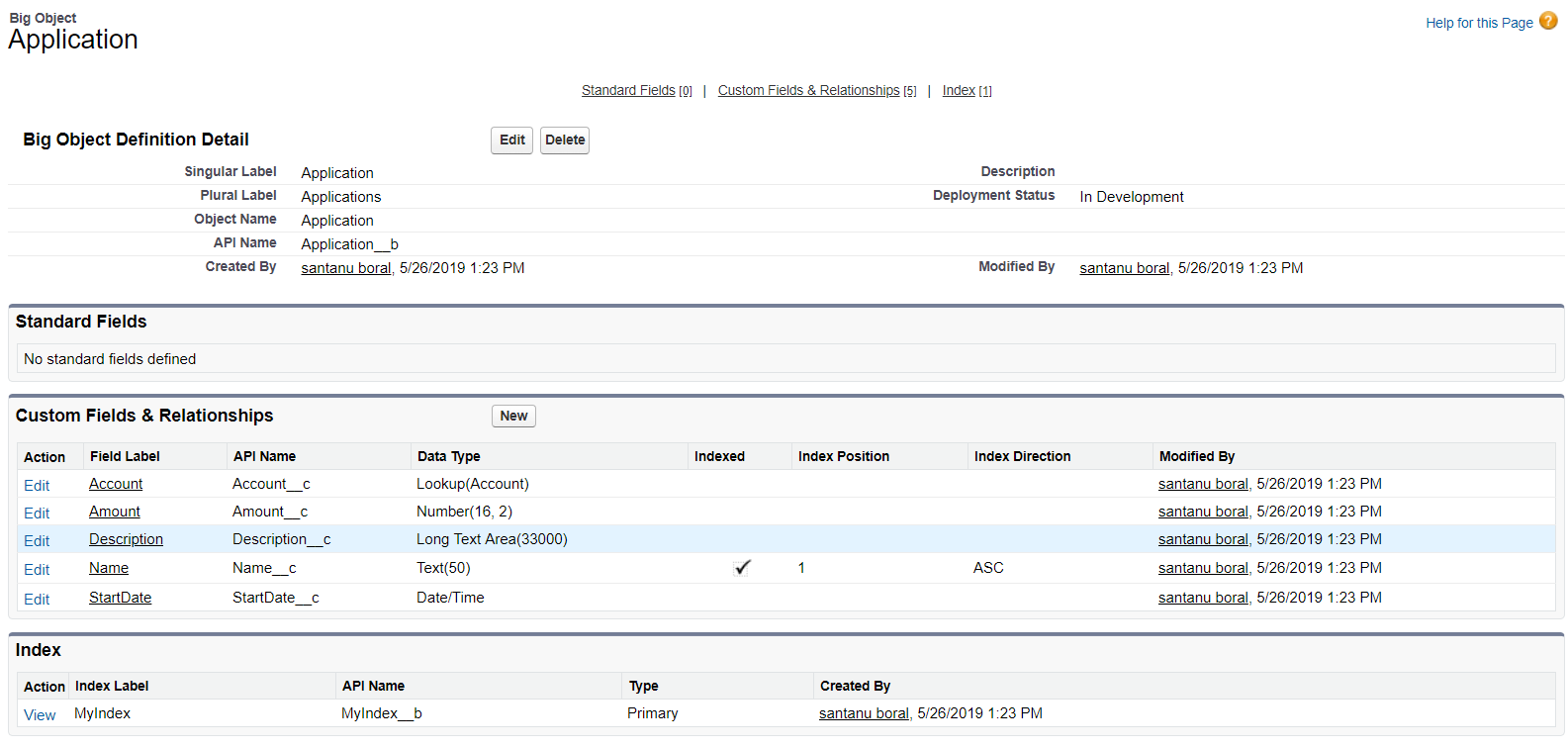
Here I have tried to create Big Object with a name Application (Application__b) with following fields:


  • Account - Lookup (Account)
  • Amount - Number (16,2)
  • Description - Long Text Area (33000)
  • Name - Text (50) and it is indexed
  • Start Date - Date/Time


  1. MetadataService.MetadataPort service = new MetadataService.MetadataPort();  
  2. service.SessionHeader = new MetadataService.SessionHeader_element();  
  3. service.SessionHeader.sessionId = UserInfo.getSessionId();  
  4.   
  5. //AllOrNoneHeader is mandatory for Big Object  
  6. service.AllOrNoneHeader = new MetadataService.AllOrNoneHeader_element();  
  7. service.AllOrNoneHeader.allOrNone = true//this is required for Big Objects  
  8.   
  9. //define Big Object  
  10. MetadataService.CustomObject bigObject = new MetadataService.CustomObject();  
  11. bigObject.fullName = 'Application__b';  
  12. bigObject.label = 'Application';  
  13. bigObject.pluralLabel = 'Applications';  
  14. bigObject.deploymentStatus = 'InDevelopment'//Make it Deployed if you need
  15.   
  16. List<MetadataService.CustomField> lstCustomFields = new List<MetadataService.CustomField>();  
  17.   
  18. //define Text Field  
  19. MetadataService.CustomField fieldObj = new MetadataService.CustomField();  
  20. fieldObj.type_x = 'Text';  
  21. fieldObj.label = 'Name';  
  22. fieldObj.fullName = 'Name__c';  
  23. fieldObj.length = 50;  
  24. fieldObj.required = true;  
  25. lstCustomFields.add(fieldObj);  
  26.   
  27. //define DateTime Field  
  28. fieldObj = new MetadataService.CustomField();  
  29. fieldObj.type_x = 'DateTime';  
  30. fieldObj.label = 'StartDate';  
  31. fieldObj.fullName = 'StartDate__c';  
  32. lstCustomFields.add(fieldObj);  
  33.   
  34. //define Number Field  
  35. fieldObj = new MetadataService.CustomField();  
  36. fieldObj.type_x = 'Number';  
  37. fieldObj.label = 'Amount';  
  38. fieldObj.fullName = 'Amount__c';  
  39. fieldObj.externalId = false;  
  40. fieldObj.precision = 18;  
  41. fieldObj.required = false;  
  42. fieldObj.scale = 2;  
  43. fieldObj.unique = false;          
  44. lstCustomFields.add(fieldObj);  
  45.   
  46. //define Long Text Area Field  
  47. fieldObj = new MetadataService.CustomField();  
  48. fieldObj.type_x = 'LongTextArea';  
  49. fieldObj.label = 'Description';  
  50. fieldObj.fullName = 'Description__c';  
  51. fieldObj.length = 33000;  
  52. fieldObj.visibleLines = 3;  
  53. fieldObj.required = false;  
  54. fieldObj.unique = false;          
  55. lstCustomFields.add(fieldObj);  
  56.   
  57.   
  58. //define Lookup Relationship with Account  
  59. fieldObj = new MetadataService.CustomField();  
  60. fieldObj.type_x = 'Lookup';  
  61. fieldObj.label = 'Account';  
  62. fieldObj.fullName = 'Account__c';  
  63. fieldObj.relationshipLabel = 'Applications';  
  64. fieldObj.relationshipName = 'Applications';  
  65. fieldObj.referenceTo = 'Account';  
  66. lstCustomFields.add(fieldObj);  
  67.   
  68. bigObject.fields = lstCustomFields;  
  69.   
  70. //define index  
  71. List<MetadataService.Index> lstIndex = new List<MetadataService.Index>() ;  
  72. MetadataService.Index indexObj = new MetadataService.Index();  
  73. indexObj.label = 'MyIndex';  
  74. indexObj.fullName = 'MyIndex';  
  75.   
  76. bigObject.indexes = lstIndex;  
  77.   
  78. //define index field and add it to index  
  79. List<MetadataService.IndexField> lstIndexFields = new List<MetadataService.IndexField>();  
  80. MetadataService.IndexField indfl = new MetadataService.IndexField();  
  81. indfl.name = 'Name__c';  
  82. indfl.sortDirection = 'ASC';  
  83. lstIndexFields.add(indfl);  
  84.   
  85. indexObj.fields = lstIndexFields;  
  86. lstIndex.add(indexObj);  
  87.   
  88. //finally create Big Object with Index field  
  89. List<MetadataService.SaveResult> saveResults =          
  90.     service.createMetadata(  
  91.         new MetadataService.Metadata[] { bigObject});         
  92.   
  93. MetadataService.SaveResult saveResult = saveResults[0];  
  94.   
  95. if(saveResult==null || saveResult.success)  
  96.     return;  
  97. // Construct error message   
  98. if(saveResult.errors!=null)  
  99. {  
  100.     System.debug('errors=' + JSON.serialize(saveResult.errors));  
  101.     List<String> messages = new List<String>();  
  102.     messages.add(  
  103.         (saveResult.errors.size()==1 ? 'Error ' : 'Errors ') +  
  104.             'occured processing component ' + saveResult.fullName + '.');  
  105.     for(MetadataService.Error error : saveResult.errors)  
  106.         messages.add(  
  107.             error.message + ' (' + error.statusCode + ').' +  
  108.             ( error.fields!=null && error.fields.size()>0 ?  
  109.                 ' Fields ' + String.join(error.fields, ',') + '.' : '' ) );  
  110.     if(messages.size()>0)  
  111.         System.debug(String.join(messages, ' '));  
  112. }  
  113. if(!saveResult.success)  
  114.     System.debug('Request failed with no specified error.');  


Pain Points


In the MetadataService.cls Index class doesn't have fullName and it should be added otherwise after creating Big Object, Index name will show as null and Index API name will should null__b


  1. public class Index {  
  2.         public MetadataService.IndexField[] fields;  
  3.         public String label;  
  4.         public String fullName; //added by Santanu otherwise index name will show null and api name as null__b  
  5.         private String[] fullName_type_info = new String[]{'fullName',SOAP_M_URI,null,'0','1','false'}; //added by Santanu  
  6.         private String[] fields_type_info = new String[]{'fields',SOAP_M_URI,null,'0','-1','false'};  
  7.         private String[] label_type_info = new String[]{'label',SOAP_M_URI,null,'1','1','false'};  
  8.         private String[] apex_schema_type_info = new String[]{SOAP_M_URI,'true','false'};  
  9.         //private String[] field_order_type_info = new String[]{'fields','label'};  
  10.         private String[] field_order_type_info = new String[]{'fields','label','fullName'}; //fullName added  
  11.     }  


I have run the scripts when I was adding fields one by one. After creating Big Object if you have to rerun the script, you need to delete the Big Object permanently if it contains Lookup field.

Secondly, you can create permission set to provide field level permissions.

Final Outcome


The Big Object has been created and found as follows:

Data Entry


To insert data into Big Object as record create an instance of the object and assign field values and use Database.insertImmediate() .

  1. Account acct = new Account(Name='Account1');  
  2. insert acct;  
  3.   
  4. Application__b appObj = new Application__b();  
  5. appObj.Name__c = 'My Application';  
  6. appObj.Amount__c = 100;  
  7. appObj.Description__c = 'Testing with data';  
  8. appObj.Account__c = acct.Id;  
  9. appObj.StartDate__c = System.today();  
  10.   
  11. Database.insertImmediate(appObj);  


References


Tuesday, April 23, 2019

Creating Salesforce Development ready Visual Studio Code IDE

Motivation behind this


Since Salesforce is recommending to use Visual Studio Code (VS Code) IDE for future development platform and not going to support Eclipse IDE after few months, so I was trying to prepare VS environment for my development purpose.

I am already having Salesforce org which has classes, pages, triggers which I want to download in my local system, create a VS project with those files and want to create new classes or components and deploy those from VS Code environment from Salesforce Org.

I have gone through Quick Start: Visual Studio Code for Salesforce Development trailhead module, but it was not able to solve few issues which I have encountered with.

Here are the steps I have followed to setup and resolved all the issues. This might be helpful for others who has not even worked with Java-J2EE platform or never worked with Eclipse IDE.


Step by Step Approach


1. Install Visual Studio Code IDE from Visual Studio Code version 1.33 download.


2. Install Salesforce CLI which is powerful Command line interface.


3.  Install Java SE version 8 from jdk8-downloads and verify Java version.


4.  Open Visual Studio and install Salesforce Externsion Pack, Salesforce CLI Integration,    ForceCode extensions.


5. From Command prompt, sfdx COMMAND. If this command is not recognized by System then verify sfdx file is available under \Salesforce CLI\bin path


6. Edit "Path" environment variable and add full path of "\Salesforce CLI\bin".


7. If JAVA_HOME is not recognized then add JAVA_HOME and JDK_HOME in System variables.


Now, all environment related setup is done.

8 . Let's create a Project (before that create Folder inside Window Explorer), press CTRL + SHIFT + P , choose SFDX:Create Project from drop down menu
SFDX: Create Project


9. System will create project explorer like this


10. Now, let's connect this project with Salesforce org. Click on "No default Org Set" at the bottom or CTRL+SHIFT+P and type SFDX: Authorize an org


Choose, appropriate org, enter org's user name and press Enter, it will open a new webpage for entering username and password and ask you to authorize.


You will see following log details in VS IDE


Now, Let's download all the classes and components available in the org to our project.

Select the Project (For example My Trailhead Project) and Click on CTRL+SHIFT+P and choose ForceCode: Get Class, Page or Trigger.


Then choose all or respective components


Finally, all the selected components will be available in the project.


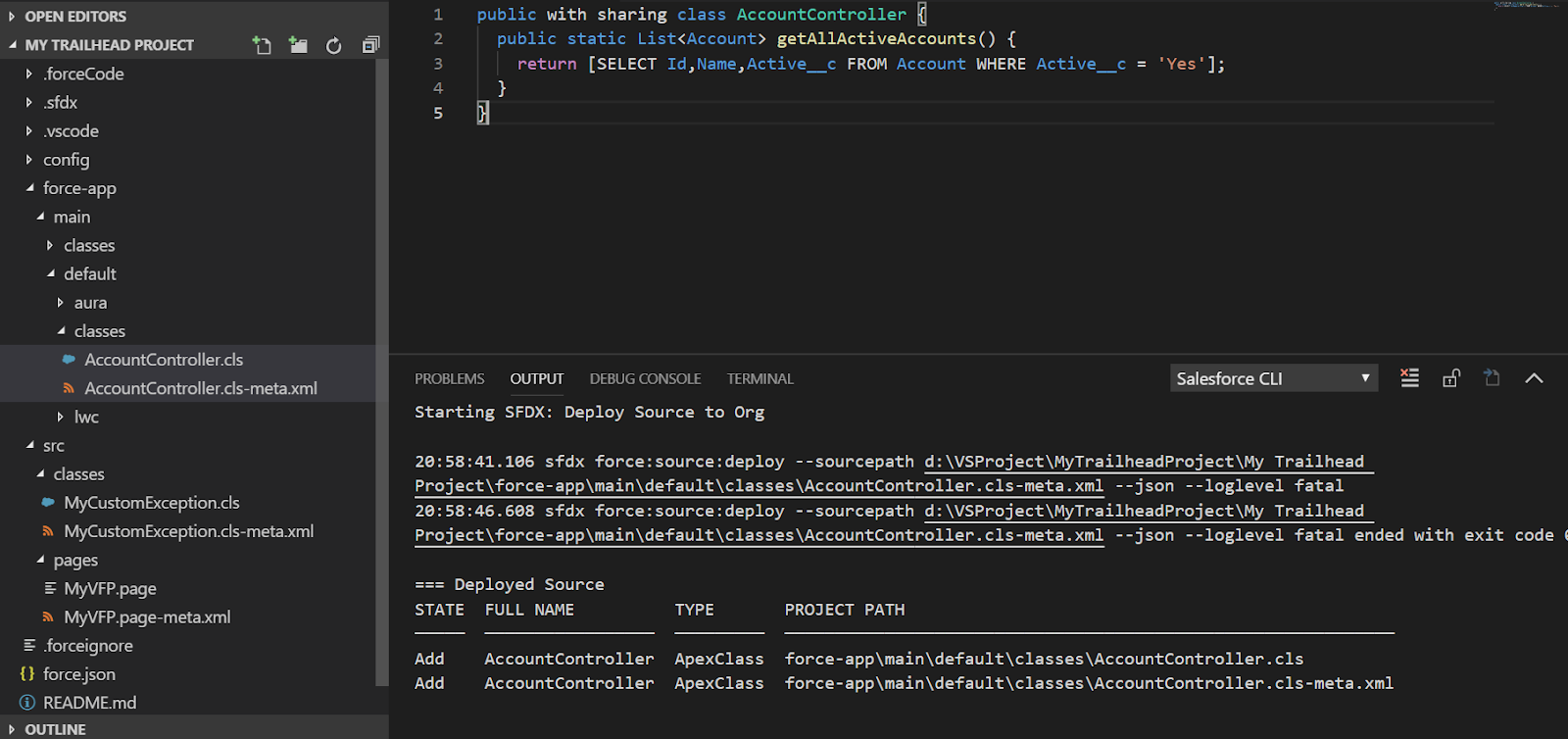
Let's try to complete this trailhead: Use Visual Studio Code for Salesforce Development

Create a new Class AccountController as mentioned in the trailhead and deploy that in the target org.


Finally, IDE is setup and working.

Related Reference


Thursday, March 28, 2019

Salesforce Lightning Platform Security and Sharing

Motivation behind this


Many a times, I thought of having a single glance of Security and Sharing architecture, but over the net I couldn't find it as a simple single flow. I am trying to portray this flow on best of my knowledge.

In the below flow, I am trying to showcase what the different layers of Platform Security and when a user tries on login to Salesforce what are the various steps come to play. 

After successful login, if that user tries to access the record then how Object level, field level security comes into picture.

Obviously, in a private sharing model, data or record sharing is always in demand and how that can be achievable.

Finally, to showcase transport layer security, if the user wants to send data from Salesforce to external system how different steps occur is good to know.

The following picture might help those aspirants who are preparing for Admin, Sales Cloud and Integration Architecture certifications.


Further Reference


Saturday, March 16, 2019

Sending daily reminders/email alerts before Event Start Date

Use Case


Business has a requirement to send to daily reminders/email alerts from 20 days prior to Event Start Date until event is not complete.


Solution


I was answering this question (How to send daily reminders/email alerts before event start date) and thought that it might be beneficial for other too. This kind of use case it also applicable to send birthday wishes to Contacts every year.

Here is the way to solve this use case.

Create a workflow rule based on `Event Start Date > Reminder Date` with other criteria like status is not closed.

Create a time-dependent workflow like `1 hour after Reminder Date`. Here you will send an email and most importantly, update `Reminder Date` field to next date.

System will compares the dates and every day until Event Start Date it will send reminders.

Flow will look like this:


Tuesday, March 12, 2019

Efficient way of dynamically casting SObject to Specific Object to update records

Use Case


Developer has a requirement to typecast specific object type from the name of SObject and try to update record of the SObject.

For example, SObject name is "Account" and Id is ''0012v00002AyZWE''.

Developer wants to update Account Name or other field values.


Solution


Create an instance of SObject based on reflection as follows:

  1. String sObjectName = 'Account';  
  2.   
  3. SObject actObj = (SObject)(Type.forName('Schema.'+ sObjectName).newInstance());  


We can also create an instance of SObject based on global describe as follows:

  1. String sObjectName = 'Account';  
  2.   
  3. SObject sObj = Schema.getGlobalDescribe().get(sObjectName).newSObject(); 

But, first one is most efficient which executes in 1ms where as second one takes 75ms and may be higher based on number of objects available at our Salesforce org.

So, lets put the desired solution:

  1. String sObjectName = 'Account';  
  2. String recordId = '0012v00002AyZWE';  
  3.   
  4. SObject actObj = (SObject)(Type.forName('Schema.'+ sObjectName).newInstance());  
  5. actObj.Id = recordId;  
  6. actObj.put('Name''New Account2');  
  7. update actObj; 

 We can easily put that in the list of SObject and update the records in one single goal.

If we have Id of a record then we can create an instance of SObject as follows:

  1. Id sampleid = '0012v00002AyZWE';  
  2. SObject actObj = sampleid.getSObjectType().newSObject();  


So, the entire solution approach will be as follows:

  1. Id sampleid = '0012v00002AyZWE';  
  2. SObject actObj = sampleid.getSObjectType().newSObject();  
  3. actObj.Id = recordId;  
  4. actObj.put('Name''New Account3');  
  5. update actObj; 

Conclusion


From the above approaches which one needs to be followed that truly depends on individual use cases. It's good that Apex provides different ways to typecast SObject to specific object.

Monday, January 21, 2019

Order of Execution - Flow chart

Motivation behind this


Few Salesforce aspirants are learning Salesforce from me and are struggling to remember and visualize the order of execution which starts with a DML operation and there are involvements of triggers, different types of out-of-box automations like process builder, workflows, flows and different rules.

I have prepared this flow chart which could be easy to understand and remember taking reference from Triggers and Order of Execution

Flow of execution


Note

I have shown the field update from workflow, it could be possible that field update can be done from Process Builder or Flow. It will also fire Before update and after update triggers.

So, we should design our system in such a way that, recursion should be eliminated. Otherwise due to recursion there will be unpredictable outcome or duplicate actions could be possible.

It is advisable that, if we have trigger on the object then not to update any field of that object through workflow or process or flows. Those updates need to be handled through trigger itself.

Monday, December 24, 2018

Transform your career to Salesforce Platform

Motivation behind this


Many a times, I have received requests from unknown aspirants through Facebook or Linkedin as to how to get started his/her career to Salesforce, or how to transform their career to Salesforce. 

Very recently, two of my colleagues  who are working on Mainframe for quite a long time and trying to learn Salesforce from me and I am guiding them on day-to-day basis.

I thought that this guidance could be good start for others to follow. The following content is indicative and may vary from person to person and based on their existing skill set.

Let's get started


       The above picture is taken from Salesforce website


2. Visually through some videos from Salesforce University to get started: 


10. Complete Superbadges based on Role that you are going to perform. Here is the link:   Trailhead Superbadges. If you complete those superbadges then you should definitely work on any real-life projects.

11. Have a look into my post Effective Salesforce certification path with preparation time saving options which will guide you about Salesforce certifications based on the roles.

12. Register for certifications at webassessor

13. Prepare your Salesforce based resume and try to get into Salesforce practice at your company or jobs.

And the journey continues.

Hope above approach will help you. For any additional input, please post as comments and I will guide you.

Also, create a twitter account if you do not have already and follow @Salesforce, @Trailhead, @SalesforceDevs, @SalesforceAdmns, Salesforce MVPs, Salesforce success community members, and any member who are passionate about Salesforce. You will really get motivated seeing others' posts and progress.

Be sure to post your progress at twitter and encourage others to learn.

Results


Both my colleagues, completed 100 trailheads within 6 weeks achieving Ranger status and are in a learning path till today.

Here are noticeable achievements recognized by @Trailhead.

  
Posted by @kingshuk1sarkar

Posted by @Sudipta1ghosh

Many congratulations to both of them!