Saturday, February 17, 2018

Platform Encryption - Things to know before activating Platform Shield

In my other post Platform Encryption - Encryption at Rest, I have talked about how platform encryption works. This is post is related to what are the things to know before activating Shield and what can be proposed solutions.


Use Case


XYZ Company is already using a Production organization for couple of years and now Business wants to encrypt following fields which might contain PII, PHI information like:

Account:
  • Name
  • Shipping Address (Street, City)
  • Other custom fields

Contact
  • Name
  • Phone
  • Mailing Address (Street, City)
  • Other custom fields
Case Comment
  • Body
Attachment
  • Body
Task
  • Description

And there could be other Custom objects and fields can be encrypted.

Analyze the impact


We can get Platform Shield license in Developer Edition to play around, but actual impact analysis can only be done on Developer or Partial Copy  or Full Copy Sandbox.

Prepare a sandbox


Contact Salesforce for activating Shield in Production, and then refresh the sandbox or without refreshing - from Company Information, click on Match Production Licenses button and wait for a mail to apply production licenses on sandbox.

Prerequisite for encryption

First, Generate Tenant Key in the org.

Go to Setup  Platform Encryption ➜ Key Management


What are the fields can be encrypted?


To encrypt Standard fields, navigate Setup  Platform Encryption ➜ Encryption Policy


And click on Encrypt Fields link to encrypt desired standard fields.


For custom fields, edit the field details.


How newly created records can be encrypted?


If we create a new field and create a record then value will be encrypted with the keys.

How existing records can be encrypted?


If we update an existing record, even if without changing any values from UI and pressing Save button, the values will be encrypted.

By loading .csv file through data loader, existing records can be encrypted.

But, for those updates we will see Last Modified By and Last Modified Date changes.

For mass update (including attachments), contact Salesforce support, who can run the job during off-hours. Beauty of this update is Last Modified By or date are not getting changed.
Secondly, no need to deactivate any triggers, workflows etc to perform this job which runs by Salesforce.

How do I know how many records are encrypted and how many are pending to be encrypted?

Encryption Statistics will give the full details.

Setup ➜ Security Controls ➜ Platform Encryption ➜ Encryption Statistics


What will happen if we try to mark the field as encrypted?

Salesforce verifies following areas if it has been used:

  • Portals
  • Criteria-Based Sharing Rules
  • SOQL/SOSL Queries
  • Formula Fields
  • Skinny Tables
  • Microsoft Integration Products


Salesforce sends an email that field cannot be encrypted because of the reasons. Here is an example.


Note: 

a. If field has been used in the report filter then marking field as encrypted will automatically remove the filters from the report. Salesforce will not show any error messages.

b. If field has been used in the list view filter then marking field as encrypted will automatically remove the filters from the list view. Salesforce will not show any error messages.

What will happen if we have existing Case comments?


If comment body contains more than 2959 characters then that record cannot be encrypted.

Also, after marking the Case Comments body field as encrypted, if we try to enter more than 2959 character, Salesforce will not allow to save.

Can encrypted fields be used in filters?


Encrypted fields are NOT available in List View filters, Report filters. Though those fields can be used a column to display those values.

Can encrypted fields be used for sorting?


Encrypted fields are NOT sort-able in List view.


Can encrypted field values be searchable by Global search?

Yes, encrypted field values are searchable through global search.


What will we see if reports are exported with encrypted data?

The extracted .csv file will shows the data in a normal way (seems like it is not encrypted).

If we run a SOQL query from Developer Console or in apex code how the encrypted data gets displayed?

The encrypted field data will return normally seems like it is not encrypted.

What could be impacts on integration, lets say from Salesforce a JSON string is passed to third party application or a third party application updating Salesforce?

There is no need for data transformation. Request will show same type of data as if it looks like un-encrypted.


[{
  "ContactID" : "0030j00000BfcpGAAR",
  "Phone" : "9087654567",
  "MiddleName" : null,
  "LastName" : "Boral",
  "FirstName" : "Santanu",
  "Fax" : null,
  "Email" : "san.boral@xyz.com"  
}]

What could be impacts on data migration if we import the data into Salesforce?

There should not be any changes to be made in the .csv and there should not be any delay due to encrypting data (minor unnoticeable lag but it's okay). 

What could be the impacts if existing managed package is already having SOQL WHERE clause with LIKE operator on Account Name which we are trying to encrypt?

Until and unless that managed package code is rectified, Account Name cannot be encrypted.

Also, it is recommended to managed packaged developer that they handle this kind of scenario, so that target organisation can perform encryption in future.

How Task's description can be encrypted?

This part is interesting. Till today (Spring 18 release), Salesforce doesn't allow Task records to be encrypted. So, if we have existing task description records then, we need to create custom object and create a custom description field (refer picture of Comment field) and store the records during creation and updating of Task.

Any changes on Platform Encryption at Spring 18 release?

Salesforce comes with filtering Encrypted Data with Deterministic Encryption (Beta) .

Deterministic encryption supports WHERE clauses in SOQL queries and is compatible with unique and external ID fields and custom indexes. 

For example, you might run a SOQL query in custom Apex code against the Contact object, where LastName = 'Smith'. If the LastName field is encrypted with probabilistic encryption, you can’t run the query. Deterministic encryption addresses this problem.

For more information, refer Filter Encrypted Data with Deterministic Encryption (Beta)

Further Reading

Platform Encryption - Encryption at Rest

References

Salesforce Shield Platform Encryption Implementation Guide


Monday, January 29, 2018

Tips for passing Salesforce Certified Identity and Access Management Designer

Today (28th Jan'2018), I have successfully passed Salesforce Certified Identity and Access Management Designer (WI18) with an overall score 79% and finally acquired certified System Architect credential.

I have faced total 65 questions. Salesforce has added 5 unscored questions.  It has taken around 90 hours of preparation exactly one month time frame.


Exam Outline


The Salesforce Certified Identity and Access Management Designer exam has the following characteristics:
  • Content: 60 multiple-choice/multiple-select questions* (5 unscored questions will be added)
  • Time allotted to complete the exam: 120 minutes (time allows for unscored questions)
  • Passing Score: 65%
  • Registration fee: USD 400, plus applicable taxes as required per local law
  • Retake fee: USD 200, plus applicable taxes as required per local law
  • Delivery options: Proctored exam delivered onsite at a testing center or in an online proctored environment. Click here for information on scheduling an exam.
  • References: No hard-copy or online materials may be referenced during the exam.
  • Prerequisite: None
*Please note that as of November 16, 2017, all Salesforce certification exams will contain five additional, randomly placed, unscored questions to gather data on question performance. The duration of each exam has been evaluated and adjusted to accommodate the inclusion of the unscored questions. These five questions will be in addition to the 60 scored questions on your exam, and will have no impact whatsoever on your score.

Preparing myself


As usual before I started my preparation, I have prepared a document and noted down all the points and advice mentioned by these guys. Thanks to all of them.

Since this exam is well known as hard exam and didn't have much experience on Identity implementation, so I have changed my mode of preparation.

First one and half week, I have gone through all Salesforce Identity and Access related videos in youtube and taken all the notes on paper. Here are the most valuable videos and surprisingly 50% of the questions I have received from this video content.


Then, started going through all the links which have mentioned in study guide.

Topics I have received on Exam


  • Different types of OAuth scope (at-least 3 questions)
  • Diffferent types of OAuth flows (at-least 4 questions)
  • SP initiated or IdP initiated flow (at-least 3 questions)
  • My Domain configurations and why it is needed (at-least 3 questions)
  • Just-in-provisioning (at-least 4 questions)
  • Different types of licensing. Specially learn about External Identity License
  • Auth Provider
  • Different type of certificates and where to find those and how to use those.
  • Two Factor authentication: How that can be implemented, Whats the decision to be taken before implementing this.
  • Canvas implementation (at-least 3 questions)
  • Custom Login flow (along with Two factor authentication) 
  • Identity Connect, when and how to use it and whats the benefits.
  • Providing access to Customers, Partner and internal employees (7-8 questions).
  • Delegated and Federated Authentications: Advantages & what are the considerations to be taken.
  • Lot of questions on providing access to the Salesforce Ideas to the non-salesforce users.

Along with my points if anyone follows those above links then anybody can pass this exam.

Good Luck!

Related Posts


Wednesday, January 3, 2018

Summary Report with Bucket Fields

Use case

Business has a requirement to display list of accounts created within specified range of days like, 30 days or within a year and wants to show the report like this way.


This type of use case is also applicable for meeting SLA purpose, like what are the list of cases solved within 24 hours or 48 hours.

Solution

This use case can be solved with the use of Summary Report with Bucket fields.

Approach

1. Create a formula field like Day Diff as Number which will calculate number of days from CreatedDate.


FLOOR( (NOW()- CreatedDate))

2. Go to Report and define Bucket field as follows. Here I have tried to define based on the data at my DE.


3. Now change the report type as Summary Report and place that bucket field for grouping and finally run the report. It will look like this.


Conclusion


This is a convenient way we can plot a report based on bucket fields.

Answering this question in stackexchange is my motivation of writing this post.

Link to stackexchange question: Create a report to show account details on different date range

Related Posts


Friday, December 29, 2017

Tips for passing Salesforce certified Integration Architecture Designer (WI18)

Today (28th Dec'2017), I have successfully passed Salesforce certified Integration Architecture Designer (WI18)  with an overall score 93%

I have faced total 60 questions. Unlike Sharing and Visibility exam and Deployment Designer exam, there are no additional questions. It has taken around 80 hours of preparation mostly one month time frame.


Exam Objective


The Salesforce Certified Integration Architecture Designer exam has the following characteristics:
  • Content: 60 multiple-choice/multiple-select questions* (5 unscored questions will be added)
  • Time allotted to complete the exam: 90 minutes (time allows for unscored questions)
  • Passing Score: 67%
  • Registration fee: USD 400, plus applicable taxes as required per local law
  • Retake fee: USD 200, plus applicable taxes as required per local law
  • Delivery options: Proctored exam delivered onsite at a testing center or in an online proctored environment. Click here for information on scheduling an exam.
  • References: No hard-copy or online materials may be referenced during the exam.
  • Prerequisite: None

*Please note that as of November 16, 2017, all Salesforce certification exams will contain five additional, randomly placed, unscored questions to gather data on question performance. The duration of each exam has been evaluated and adjusted to accommodate the inclusion of the unscored questions. These five questions will be in addition to the 60 scored questions on your exam, and will have no impact whatsoever on your score.

Preparing myself


Before I started my preparation, I have prepared a document and noted down all the points and advice mentioned by these guys. Thanks to all of them.

Topics I have received on Exam


  • Different types of APIs (SOAP, REST, BULK, Metadata), their usage, restrictions and limitations
  • Advantages of using them over another. 
  • Lots of questions of Outbound messages and following points to be noted
    • It has guaranteed delivery and may produce duplicate records in the consumer system.
    • It can pass SessionId
    • To consume it, the end point listener must have SOAP API implementation
    • Declarative way of making outbound call
    • It doesn't allow multiple objects
    • It allows junction object
    • Callback of this message should incur API limit
  • Bulk data load (Bulk API parallel mode and Serial mode with different batch size)
  • Confusing question on SOAP API (parallel mode)
  • API limit
    • Note that SOAP API callout to external system doesn't consume API limit.
    • Bulk API has separate API limit (refer documentation)
  • Unauthenticated and Authenticated mashup. First one is for Custom web tab, second one is for Canvas
  • Different types of testing, like regression, unit, UAT, Continuous integration
  • Different kinds of design patterns and which can be used over another
  • Apex Webservice (SOAP and REST based)
  • Data replication API, SOAP based getUpdated() usage.
  • Salesforce-to-Salesforce (when should be done and not to be)
  • Different kinds of authentication mechanism (including canvas)
  • Different types of sandboxes and which one is suitable for different types of testing
  • Data loading tools (Data loader, Data Import wizard, Workbench)
  • Usage of middleware (4 to 5 questions) and ESB (Enterprise Service Bus)
  • Off-platform de-duplication and Salesforce out-of-box duplicate management (when to use what?)
  • Encryption on rest and transmit - Base64 encoding, platform encryption, encryption with shared key
  • IP white-listing and considerations on firewall.
If anyone follows above links and study material completely then definitely could clear this exam at first try. All the questions are from study materials and based on real life scenarios.

Above all, it's a great relief passing this exam.

Related Posts


Wednesday, December 20, 2017

Visualforce with JQuery Datatable for sorting, pagination and handling 10000 records

Use Case


Sometimes we get a requirement to display tabular data in visualforce which will have following features:


  • Data will be displayed in paginated way.
  • Column headers must be sortable
  • Keyword search in the list itself.
  • More over if we want to display 10000 records in the list.

Solution

We can leverage JQuery datatable library to achieve those functionalities.

Controller


 1
 2
 3
 4
 5
 6
 7
 8
 9
10
11
12
13
14
15
16
17
18
19
20
21
22
23
24
25
26
27
28
29
30
31
32
33
34
35
36
37
38
39
40
41
42
43
public with sharing class SortWrapper 
{

    public List<ContactInfoWrapper> ContactsWrapper {get; set;}    
    //added for paginnation
    public List<List<ContactInfoWrapper>> listofContactsWrapper {get; set;}
    
    public SortWrapper()
    {
  ContactsWrapper = new List<ContactInfoWrapper>();
  listofContactsWrapper = new List<List<ContactInfoWrapper>>();
        getContacts();
    } 
     
    public void getContacts()   
    {
        for(Contact s:[SELECT Id, Name, Email, Phone, Account.Name FROM Contact])
        {            
            ContactsWrapper.add(new ContactInfoWrapper(s)); 
            if(ContactsWrapper.size() == 999)
   {
    listofContactsWrapper.add(ContactsWrapper);
    ContactsWrapper= new List<ContactInfoWrapper>();
            }                
        } 
        if(ContactsWrapper.size() != 0){
   listofContactsWrapper.add(ContactsWrapper);
     }   
        
    }
    
 //Wrapper class
    public class ContactInfoWrapper
    {
        public Contact sObj{get;set;}
        public Boolean checked {get;set;}
        public ContactInfoWrapper(Contact con)
        {
            sObj = con;  
            checked=false;  
        } 
    }
}

Visualforce


 1
 2
 3
 4
 5
 6
 7
 8
 9
10
11
12
13
14
15
16
17
18
19
20
21
22
23
24
25
26
27
28
29
30
31
32
33
34
35
36
37
38
39
40
41
42
43
44
45
46
47
48
49
50
<apex:page id="SortPage" controller="SortWrapper"  showHeader="false">
    <!--added for pagination-->
       <head>
        <apex:includescript value="//code.jquery.com/jquery-1.11.1.min.js" / >
        <apex:includescript value="//cdn.datatables.net/1.10.4/js/jquery.dataTables.min.js" />
        <apex:stylesheet value="//cdn.datatables.net/1.10.4/css/jquery.dataTables.css" />
        <script>
            j$ = jQuery.noConflict();
            j$(document).ready( function () {
                var contactTable = j$('[id$="contacttable"]').DataTable({
                    
                });
            });
        </script>
    </head>
   <!---End of Pagination--->
   
    <apex:form id="myForm">
   
        <apex:sectionHeader title="Contact"/><br/>
        
        <apex:pageBlock>
            
            <apex:pageBlockSection title="Contact Records" collapsible="false" columns="1"/>
            <br></br>
            <body>                
                <table id="contacttable" class="display">       
                    <thead>
                        <tr>
                            <th style="width:10%;">Select</th>
                            <th style="width:25%;">Name</th>
                            <th style="width:30%;">Account Name</th>                                
                        </tr>
                    </thead>
                    <tbody>
                        <apex:repeat value="{!listofContactsWrapper}" var="contactinfowrp" id="tableInd">
                              <apex:repeat value="{!contactinfowrp}" var="con">
                               <tr >
                                  <td><apex:inputCheckbox value="{!con.checked}"/></td>
                                  <td>{!con.sObj.Name}</td>
                                  <td>{!con.sObj.Account.Name}</td>
                              </tr>
                            </apex:repeat>
                        </apex:repeat>
                    </tbody>
                </table>
            </body>
        </apex:pageBlock>  
    </apex:form>
</apex:page>

Outcome


Friday, December 15, 2017

Tips for passing Salesforce certified Development Lifecycle and Deployment Designer

Today (14th Dec'2017) I have successfully passed Salesforce certified Development Lifecycle and Deployment Designer exam.

I have faced 65 questions (including 5 unscored questions) and for me it has taken total 25 hours (almost 3 and half days) to prepare for this exam and my overall score is 84%


Exam Objective


The Salesforce Certified Development Lifecycle and Deployment Designer exam has the following characteristics:
  • Content: 60 multiple-choice/multiple-select questions* (5 unscored questions will be added)
  • Time allotted to complete the exam: 90 minutes (time allows for unscored questions)
  • Passing Score: 68%
  • Registration fee: USD 400, plus applicable taxes as required per local law
  • Retake fee: USD 200, plus applicable taxes as required per local law
  • Delivery options: Proctored exam delivered onsite at a testing center or in an online proctored environment. Click here for information on scheduling an exam.
  • References: No hard-copy or online materials may be referenced during the exam.
  • Prerequisite: None

*Please note that as of November 16, 2017, all Salesforce certification exams will contain five additional, randomly placed, unscored questions to gather data on question performance. The duration of each exam has been evaluated and adjusted to accommodate the inclusion of the unscored questions. These five questions will be in addition to the 60 scored questions on your exam, and will have no impact whatsoever on your score.

Preparing myself


Before I started my preparation, I have prepared a document and noted down all the points and advice mentioned by these guys. Thanks to all of them.


Topics I have received on Exam


  • What is the advantages and disadvantages of Waterfall and Agile methodology.
  • When to use what type of sandboxes (Developer edition, partial copy, fullcopy)
  • Deployment approach for hotfixes.
  • Deployment approach for Daily, Minor, Major releases
  • Metadata API
  • Given a scenario which deployment tool is most preferable (Force.com IDE, ChangeSet, Force.com Migration tool)
  • Role & Responsibilities of CoE, Architecture Review Board, Release Manager
  • Given a scenario for mitigating risk of deployments
  • Testing best practices
  • Ant based deployment with different types of braching
  • Continuous Integration with source code control system
  • Agile accelerator and its usage.
  • Managed and unmanaged package (when to use what)
  • Conflicting situation during salesforce release and your release and how to handle the situation

Overall, this exam is relatively easy as compared to my earlier architect exams like Sharing and Data designer exams. My real life project experience has helped me passing the exam with relatively few hours of preparation.

Related Posts


Sunday, December 10, 2017

Platform Encryption - Encryption at Rest


Use Case

Recently, I got a requirement to implement Salesforce Shield (platform encryption) at our salesforce organization. It brings a question to me how Salesforce uses platform encryption and encrypt the data at Rest.

Solution

If we refer Salesforce Shield Platform Encryption Implementation Guide, we get to know how below process flow works and I am not going deep into this as going through the pdf we can understand the flow and ultimately data is derived based on master key and tenant key.


For a sake of proof of concept, I have defined Case Subject, Description and Case comment fields to be encrypted.

To do this follow: Setup -> Platform Encryption


Click on Encrypt Fields link to reach Encrypt Standard Field page and defined as follows:


Then, I have created a sample case with this subject and description:

If I try to query the same case record from the Developer Console, it returns as follows:


Now, how can I prove that data is encrypted as I can see the data as usual. Moreover there is no such proof of Encypted indicator as I can see for attachment as follows:


This makes me curious about this poc.

Approach


First I described the Case Subject field from workbench and it displays as encrypted and also thought that I am an authorized user to access this record that's why I can read the data in a normal way. But I was not satisfied with this.


To make it full proof, I archived the tenant key and exported the key as backup.


Then, destroyed the tenant key based on which that case subject and description got generated.


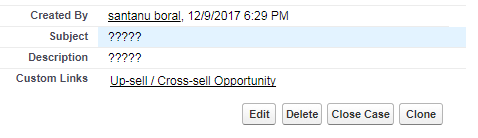
Now, accessed the same record, it is showing ????? (means, This service is unavailable now). This means encrypted data which has been encrypted with my previous tenant key is not available.

That sounds interesting to me.

But, how can I retrieve the previous data then?

So, I imported the same previous tenant key as follows:


After importing, accessed the same case record. It showed the data again.

Conclusion


It gives me confidence that subject and description standard fields have been encrypted properly with Salesforce shield and encrypted at Rest.


Further Reading


Platform Encryption - Things to know before activating Platform Shield