Showing posts with label Administrator. Show all posts

Tuesday, November 23, 2021

Tips for passing Salesforce Marketing Cloud Administrator Certification


Motivation behind this


Yesterday 22nd Nov,2021 I have passed Salesforce Marketing Cloud Admin certification. Sharing my learnings to help trailblazers to prepare for this certification.


Exam Outline


Content: 60 multiple-choice / multiple-select questions (plus 5 unscored questions)
Time allotted to complete the exam: 105 minutes
Passing score: 67%
Registration fee: USD 200 plus applicable taxes as required per local law
Delivery options: Proctored exam delivered in an online proctored environment
References: No hard-copy or online materials may be referenced during the exam

Topics


Topics

Weighting

Digital marketing proficiency

13%

Subscriber data management

18%

Setup

38%

Channel Management

16%

Maintenance

15%


Preparation


I have attended Prepare for your Marketing Cloud Administrator Certification Exam (CRT250)  which has given great coverage on the subject.


There are following blogs and resources to follow:


Few Important points to cover for exam


  • Consent Management
  • Data protection
  • Use of Marketing Cloud Connect
  • IP Allowlisting
  • Burst Email Sending
  • Parameter Management
  • Setup Assistant and what are the things we can do
  • Use of Analytics Builder
  • Einstein Engagement Scoring
  • MobileConnect
  • MobilePush
  • Keyword Management
  • Session Settings and timeout
  • Password policies
  • FTP Account Configuration
  • Tokenized Sending
  • Contact Builder
  • Use of Contact Id, Subscriber Key
  • Data Designer and building relationship between objects
  • Use of Primary Key
  • Send Log Data Extension
  • Profile Center and Subscription Center
  • Roles and Permissions, and use of Standard Marketing Cloud Roles
  • Security Best practices
  • Troubleshooting Insufficient access
  • IP Warming
  • Reply Email Management
  • Journey Builder, setting up goal, entry source
  • Super Messages
  • SOL Query Activity
  • Notification options
  • Deployment Manager

Happy Learning!
Further Reading for other certifications


Friday, September 17, 2021

Tips for passing Accredited B2B Commerce Lightning Administrator Certification


Motivation behind this


Recently 7th Sept,2021 I have passed B2B Commerce Lightning Administrator and Developer accredited certifications. Last year I have cleared both these certifications which are on classic version which Salesforce has retired from mid of August,2021.

Salesforce has provided training on B2B Commerce through partner enablement program and both of the courses available on PLC (Partner Learning Camp).

Right now there is 50% discount going on and it is available on $75 + tax which motivates me to appear on those certifications and happy to see me passed.


Exam Outline


Content: 60 multiple-choice / multiple-select questions
Time allotted to complete the exam: 120 minutes
Passing score: 75%
Registration fee: USD 150 plus applicable taxes as required per local law
Delivery options: Proctored exam delivered in an online proctored environment that can be accessed through Partner Learning Camp
References: No hard-copy or online materials may be referenced during the exam

Topics


Topics

Weighting

Salesforce B2B Commerce Basics

15%

Salesforce B2B Commerce App

20%

Storefront Deployment

20%

Product Organization and Administration

15%

Content Integration

7%

Storefront Management

17%

Advanced Topics

6%


Preparation


B2B Commerce is built on Experience Cloud, CMS, Flow and Lightning Web Components (Customization). So configuration knowledge of those are kind of pre-requisites.

There are hands on trainings are available for partners which are crucial to learn and pass this exam.

From PLC, Register for "B2B Commerce Lightning Experience foundations for Administrators" and there are 6 courses in it.

There are B2B Commerce related trailhead modules to be followed:

I have written blog posts which will definitely help to pass Admin.


Understand this data model very well


Understand the following administration very well


Few Important points to cover for exam


  • License Type needed for Buyer, Buyer Manager and Account Switcher Users and their permissions
  • Use of Buyer Group, Entitlements, Products, Price Books
  • Store Administrations
  • Relationship among objects as depicted in the data model above
  • Record sharing
  • Basics of Flow
  • Checkout flow
  • Configurations on Experience Cloud
  • All the sharing settings of the objects configured
  • Loading data for Store creation
  • Supported Languages
  • Multi-currency
Happy Learning!

Friday, September 10, 2021

Administering B2B Commerce Lightning at Developer Edition


Motivation behind this


I have been exploring B2B Commerce Lightning since last year through Partner Enablement program designed by Salesforce. Right now, Salesforce is enabling partners through Partner Learning Camp and there are many courses available including B2B Commerce Admin and Developer.
Recently, B2B Commerce license is available at any Developer Edition which drives to me to build a website.

For purpose of building this website, I have taken few snaps of the goodies which I have received/achieved from Salesforce which can be a get start to build this.

During this journey, Abdul Molla has helped me a lot which drives to write for all the Trailblazers who are interested to learn B2B Commerce.

Lets' get started.

Basics to know


B2B Commerce Lightning has been developed on Experience Cloud, CMS, Flows, Lightning Web Components. So better to get familiar on those. 

Before start configuring, following trailhead module will help to understand basics.

Steps to follow


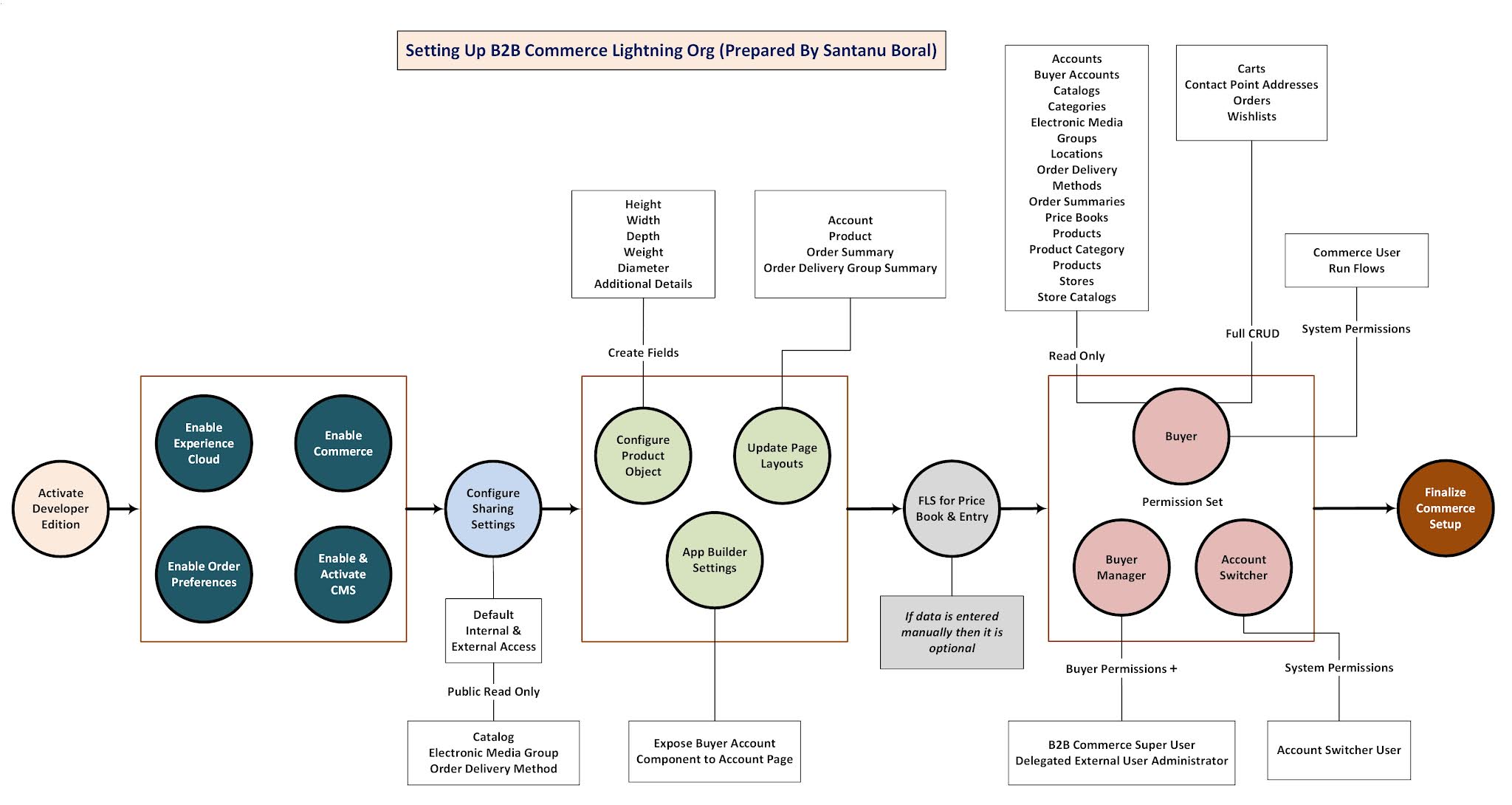
We will go step by step as I have shown in following diagram.


For easy reference, color of each heading below will match the color of symbol of above picture.

1. Sign up a Developer Edition


    Follow this link

2. Enable Experience Cloud


    a) From Setup Ã  Digital Experiences, enable Experience Cloud and create a domain.


   b) Choose - Allow using standard external profiles for self-registration, user creation, and login.


3. Enable Commerce


    From Setup, you can reach here to enable commerce. This is heart of B2B Commerce.


4. Enable Order Preferences


    From Setup, reach Order Settings and choose Enable Enhanced Commerce Orders. Choose other 2 options as shown in picture.


4. Enable & Activate CMS


    a) Edit System Administrator profile and choose Salesforce CMS at Custom App Settings section.


 b) Go to Tab Setting Section and make following tabs as Default On for these 4 CMS items:
  • CMS Home
  • CMS Channels
  • CMS Experiences
  • CMS Workspaces
c) Make following tabs to Default On too.
  • Commerce Setup
  • Buyer Group Price Books 
  • Buyer Groups
  • Catalogs
  • Categories
  • Entitlement Policies 
  • Guest Buyer Profile
  • Price Adjustment Schedules
  • Pricing Workspace
  • Product Workspace
  • Store Price Books
  • Stores
  • Order Summaries
d) Verify CMS

From App Launcher open Salesforce CMS App and verify tabs.


5. Configure Sharing Settings


Sharing Settings, make Default Internal Access and Default External Access to be Public Read Only for:


  • Catalog
  • Electronic Media Group
  • Order Delivery Method

6. Configure Product Object


Create following Custom fields in Product and assign it to Customer Community Plus User.
  • Height
  • Width
  • Depth
  • Weight
  • Diameter
  • Additional Details

7. Update Page Layouts


a) Product Page Layout
  • Product SKU field to be added in layout
  • Categories and Commerce Entitlement Policies to be added in related list
b) Order Summary Page Layout

Keep only Start Reorder action at at Salesforce Mobile and Lightning Experience Actions section and remove others.


c) Order Delivery Group Summary Page Layout

Add Product Name as column in Order Product Summaries Related List


d) Account Page Layout

  • Add Community Members and Contact Point Address as Related List
  • Enable as Buyer actions to be added in Salesforce Mobile and Lightning Experience Actions


8. App Builder Settings - Account Record Page


Choose any Account record and edit Page, drag Buyer Account component to the page layout.


9. Field Level Security for Pricebook and PriceBookEntry


a) Create ExternalId field (ExternalId__c) at PriceBook object and make is visible to Customer Community Plus user

b) Navigate to Standard Price Book record and update ExternalId = standardpricebook and Active=true
(You can create a new List View to see list of price book records)


c) Create ExternalId field (ExternalId__c) at PriceBookEntry object and make is visible to Customer Community Plus user

This is needed if we load data through dataloader and if pricing is available from outside of Salesforce.

10. Permission Sets for Buyers, Buyer Managers and Account Switchers


a) Buyer Permission Set

  • Create permission set name as Buyer and assign Customer Community Plus license


  • Assign Read access to following objects:
    • Accounts
    • Buyer Accounts
    • Catalogs
    • Categories
    • Electronic Media Groups
    • Locations
    • Order Delivery Methods
    • Order Summaries
    • Price Books
    • Products
    • Product Category Products
    • Stores
    • Store Catalogs
Here is an example:
  • Assign Full CRUD access to following objects:
    • Carts
    • Contact Point Addresses
    • Orders
    • Wishlists
  • For Contact Point Address object, assign Read permission to all fields.


  • Assign System Permissions
    • Commerce User
    • Run Flows

b) Buyer Manager Permission Set
  • Clone Buyer permission set and name it as Buyer Manager.
  • From System Permissions, choose B2B Commerce Super User
  • From App Permissions, choose Delegated External User Administrator
b) Account Switcher Permission Set
  • Create a new permission set called Account Switcher and assign Customer Community Plus license
  • In the System Permission section, choose Account Switcher User

11. Finalization of Commerce Setup


a) Enable Data Translation and Multi-Currency from Company Information


b) Field Accessibility - 

  • From Setup -> Field Accessibility -> Select Order object -> View By Fields -> Choose Sales Store
  • Select System Administrator profile to make it visible

  • Commerce Setup from App Launcher and verify this

  • Install 3 out-of-box reports clicking on Commerce Setup
    • Average Order Value
    • Orders By Date
    • Total Orders

That's all. Thanks for your patience to complete.

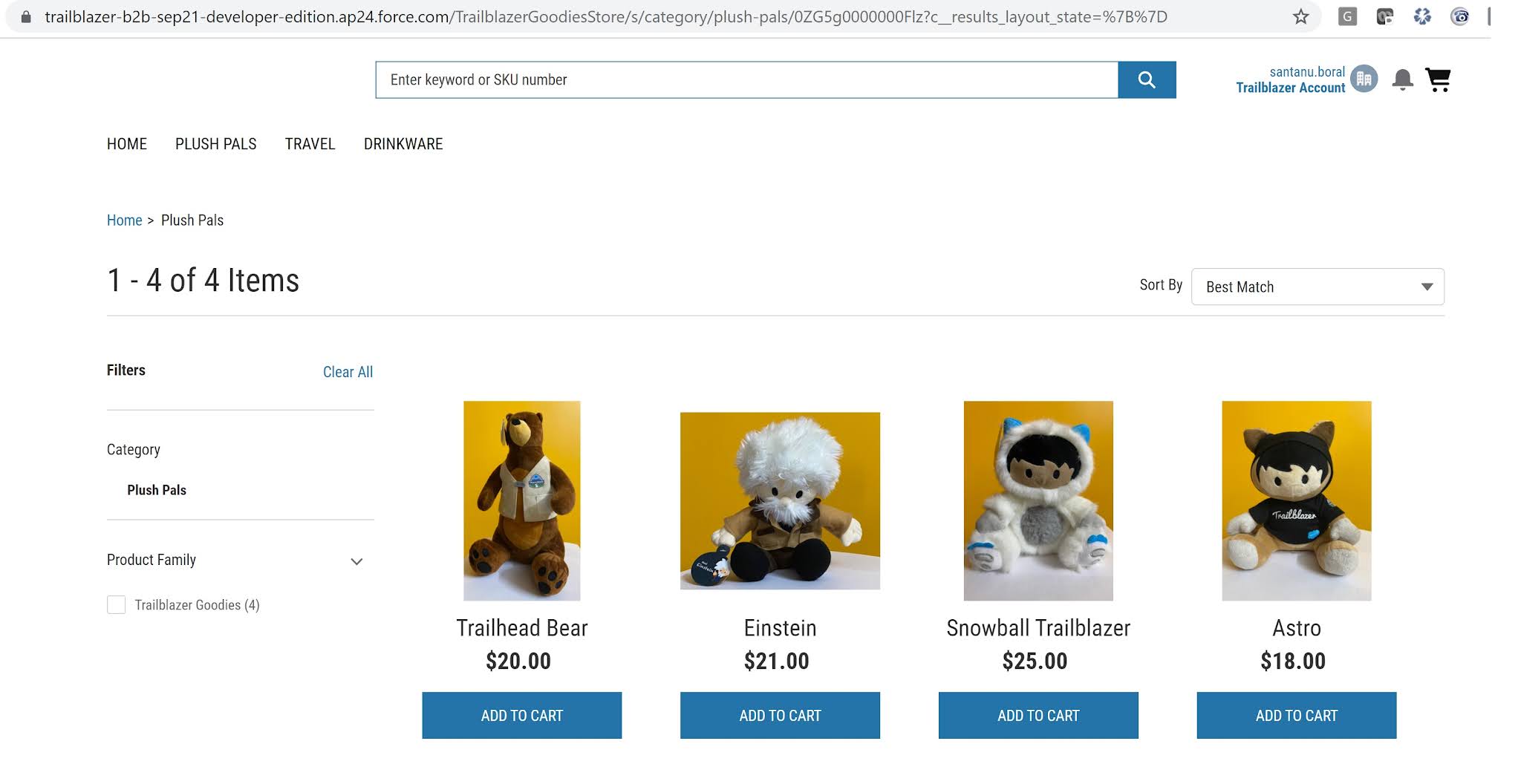
In the next post, we will Configure the Store and complete checkout process which will look like this:


Happy Learning!
Monday, June 8, 2020

Tips for passing Salesforce B2B Commerce Administrator Certification

Motivation behind this


Yesterday (7th June,2020), I have successfully passed B2B Commerce Administrator certification. Now a days, there will be lot of opportunities on B2B Commerce space which motivates me to learn this.

Right now, there are very limited guidance for preparing B2B Commerce Cloud certification, that's why thought of sharing this. Here are few tips to pass this exam.

Exam Outline


  • Prerequisite: There are no prerequisites for taking this exam
  • Exam Format: 50 multiple-choice questions
  • Time allotted to complete the exam: 90 minutes
  • Passing score: 70%
  • Registration fee: 200 USD
  • Delivery options: Online proctored or onsite proctored delivery. 
  • Results: Provided immediately after exam submission as on-screen text and by email.
  • See the Salesforce Accredited B2B Commerce Administrator Exam Guide for more information about this credential.

I have given myself three weeks of time frame around 60 hours to learn and prepare for this certification and happy to see me passed.


Preparation

  • Completed Salesforce B2B Commerce Basics trailhead module.
  • Getting a org, since I am working for Salesforce ISV Partner so got an org to explore on this. You can install B2B Commerce package at your Developer Edition to explore it.
  • Install package from this Link
  • Link to Partner Navigator (available for Salesforce Partners) B2B Commerce Learning Path
Here is the coverage of Deck Videos:


One Stop Resource


Core Data Model


User and Account Data 

This diagram shows how a community user is related to Account and Storefront.


Pricing and Entitlement

CC Account Group is driving pricing and products which customer can see.


User Presentation

One of the important data models on how Product, Categories, Promotions are related and what are the objects related to internationalization.


Topics to Consider for Exam


I have categorized the topics as follows, for easy reference I have mentioned wiki as hyperlink.


    • Home Page:How to define Spotlight Products, Featured Products, Effective Accounts, Different Widgets.
  • Buyer Accounts and Other Storefront users:
    • Account GroupsAccount groups determine the products and prices your customers see.
    • Effective Accounts : Ability for an user to choose Accounts to browse through the product and place order.
    • CSR Guide : Ability for a Customer Service Rep to login on behalf of Customer.
  • Product and Pricing: This section is most important, there are lots of question with different combinations.
    • Products : Check different types of combinations like Bundles, Kits, Dynamic Kits, Aggregated, Assembly and how products are defined, how pricing is defined, which Component is used for maintaining relationships. Following diagram gives more clarity.


    • Price Lists : How the price lists is defined, check Pricing Strategies Tier based Pricing, Subscription Pricing, Attribute Driven Commerce.


    • Category Product Spec Filter : which helps to Customer to find products.
    • Promotions : How the promotions can be defined, what are the image sources, what the points to be considered for multiple languages.
    • Contract Pricing : Why it is important to link with CC Price Group instead of CC Account Group.

    • Coupons : What types of discounts we can offer, what is the rule types and where Coupons can be applicable or not applicable.
  • Localization: How to localize Storefront, User and Object Localization
  • Seller Market Place : Configuring sellers
Hope, it will help you to prepare for this exam.